
If you’ve ever typed a question into ChatGPT, asked Gemini to summarize an article, or had Claude help you write an email, you’ve used an AI model. But what is it, really? Not the app, not the chat window — the actual “brain” doing the work behind the scenes.
This guide breaks it down in plain English. No computer science degree required. By the end, you’ll understand what an AI model is, the different types out there, how the top AI models of 2026 stack up, and how to pick the best AI model for whatever you’re trying to do.
Table of Contents
What Is an AI Model?
Simple Explanation
Think of an AI model as a giant pattern-recognition engine. It’s been trained on massive amounts of text, images, code, or other data, and through that training, it learns statistical patterns — which words tend to follow other words, what a cat looks like in a photo, how a well-structured Python function is put together.

When you type a prompt, the model isn’t “looking things up” like a search engine. It’s predicting, piece by piece, what the most useful next word (or pixel, or line of code) should be, based on everything it learned during training. Do that well enough, at a large enough scale, and you get something that can write essays, hold a conversation, generate images, or debug your code.
That’s really it. An AI model is the underlying engine — the trained neural network — that powers the AI experience you interact with.
Difference Between an AI Model and an AI Tool
This is where a lot of beginners get confused, so let’s clear it up:
- An AI model is the raw engine — GPT-5.5, Claude, Gemini 3.1 Pro, Grok, DeepSeek. It’s the trained system that generates the output.
- An AI tool is the product built around that engine — the chat interface, the app, the website. ChatGPT is a tool built on OpenAI’s models. Jasper, Notion AI, and dozens of other writing tools are built on top of models like GPT or Claude rather than being models themselves.
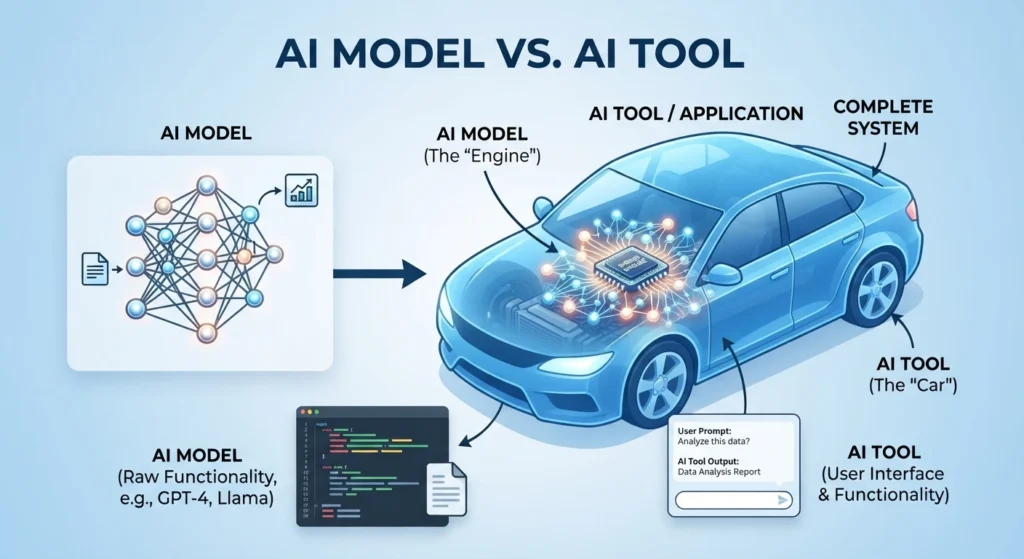
In other words, the model is the engine, and the tool is the car. Many different cars (tools) can be built using the same engine (model), and some tools even let you switch between engines depending on the task.
Types of AI Models
Not every AI model does the same job. Here’s a quick tour of the main categories you’ll run into.
Text Generation Models
These are large language models (LLMs) — the category most people think of first. They’re trained on huge volumes of text and are built to understand and generate human-like language. This covers everything from answering questions and writing blog posts to summarizing documents and holding a natural conversation. ChatGPT, Claude, and Gemini all fall into this bucket, alongside open-source options like DeepSeek and Qwen.
Image Generation Models
These models turn a text prompt into a picture. They’ve learned the relationship between words and visual concepts, so when you type “a watercolor painting of a mountain at sunset,” they generate pixels that match that description. Midjourney, DALL·E, and Google’s image generation tools are the well-known names here.
Video Generation Models
The newest and fastest-moving category. Video models generate short clips from text prompts or still images, handling motion, lighting, and scene continuity — something far harder than a single static image. This space has moved quickly through 2026, with tools now producing longer, more coherent clips than what was possible even a year ago.
Coding Models
These are LLMs fine-tuned specifically for writing, explaining, and debugging code. They understand programming languages, frameworks, and logic the way general models understand conversational language. Some are standalone (like specialized coding variants of GPT and Claude), while others are built directly into IDEs and developer tools as autonomous coding agents.
Top AI Models in 2026
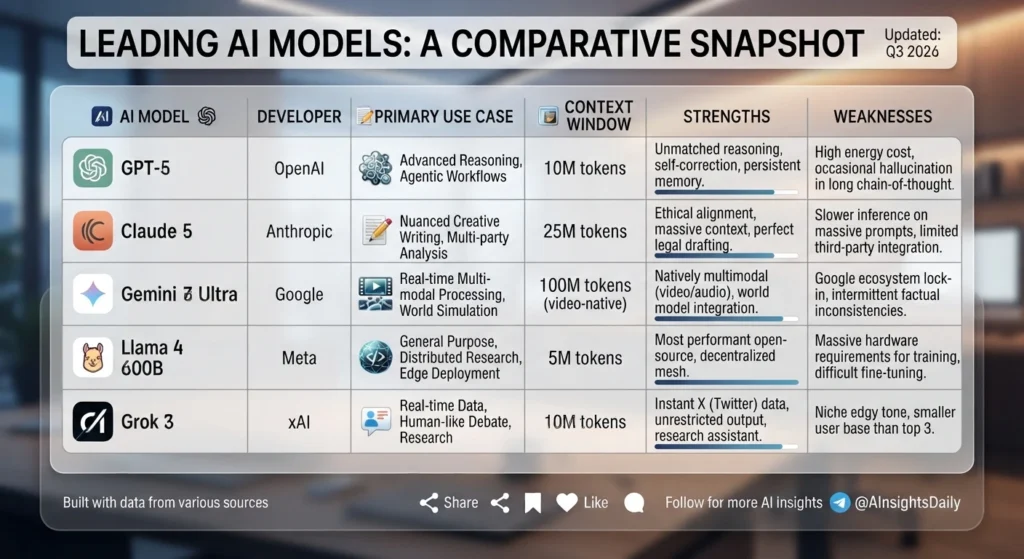
The AI model landscape moves fast, and 2026 has already brought several major upgrades across the board. Sites like Artificial Analysis and LMArena track these releases and benchmark them independently if you want to dig into the raw numbers. Here’s where the major players stand right now.
ChatGPT (OpenAI) remains one of the most widely used AI assistants, built on OpenAI’s GPT model family. Recent versions have focused on faster responses, stronger agentic coding through Codex, and more natural, customizable conversation style — making it a strong all-rounder for writing, research, and everyday tasks. For a deeper side-by-side, see our full ChatGPT vs Claude comparison.
Claude (Anthropic) has built a reputation around careful, well-reasoned answers and strong performance on long documents and coding tasks, thanks to a large context window that lets it work with lengthy files without losing track of detail. It’s a favorite for professional and business use where accuracy and nuance matter. Curious how it stacks up against OpenAI’s model? Check out our ChatGPT vs Claude comparison.
Gemini (Google) is deeply integrated into Google Search, Workspace, and the Gemini app, which makes it a natural pick if you already live inside the Google ecosystem. It’s known for strong multimodal reasoning — handling text, images, and video together — and for scoring well on complex reasoning benchmarks.
Grok (xAI) leans into real-time awareness, pulling in live data from X, and has built a following for its more casual, less filtered tone. It’s a solid option if you want an assistant that feels current and conversational rather than formal. We break this matchup down in detail in our Grok vs ChatGPT 2026 comparison.
DeepSeek has become one of the most talked-about open-source model families, offering strong reasoning and coding performance at a fraction of the cost of closed models. It’s a popular choice for developers and businesses that want frontier-level capability without frontier-level pricing.
Qwen (Alibaba) rounds out the open-source frontier, with strong benchmark results in coding, reasoning, and general knowledge. Its range of model sizes — from lightweight to very large — makes it flexible for anything from a simple chatbot to a heavy-duty research assistant.
How to Choose the Right AI Model
There’s no single “best AI model” for everyone — the right pick depends on what you’re actually trying to get done. Here’s a quick breakdown by use case.
For writing: Look for a model known for natural tone, editing flexibility, and nuance — this is where Claude and ChatGPT tend to shine, especially for longer-form content, brand voice consistency, and editing existing drafts rather than just generating from scratch.
For coding: Prioritize models with strong benchmark performance on coding tasks and agentic capability — meaning they can plan and execute multi-step coding work, not just autocomplete a line. GPT’s coding-focused variants, Claude, and open-source options like DeepSeek all perform well here, so it’s worth testing a couple against your actual codebase.
For research: You want strong reasoning, up-to-date information, and the ability to handle long documents without losing context. Gemini’s integration with Search and large context windows across several models make this category increasingly competitive.
For business: Reliability, accuracy, and enterprise features (data privacy, integrations, admin controls) matter more than raw benchmark scores. This is often where Claude and ChatGPT’s business tiers get chosen over flashier, less predictable alternatives.
For students: Free tiers, clear explanations, and a conversational, patient tone go a long way. Most major models now offer capable free versions, so it’s worth trying two or three on the same homework question and seeing which explanation actually clicks.
AI Models Comparison Table
| AI Model | Best For | Strengths | Free Tier | Ideal User |
|---|---|---|---|---|
| ChatGPT (OpenAI) | All-round use, coding | Fast, versatile, huge ecosystem | Yes | Everyday users, developers |
| Claude (Anthropic) | Writing, business, long documents | Careful reasoning, large context window | Yes | Professionals, writers, businesses |
| Gemini (Google) | Research, multimodal tasks | Deep Google integration, strong reasoning | Yes | Google Workspace users, researchers |
| Grok (xAI) | Real-time info, casual chat | Live data access, conversational tone | Yes | Social media users, X power users |
| DeepSeek | Coding, cost-efficient reasoning | Open-source, strong performance-to-cost ratio | Yes | Developers, budget-conscious teams |
| Qwen (Alibaba) | Coding, flexible deployment | Range of model sizes, strong benchmarks | Yes | Developers, businesses needing scale |
Frequently Asked Questions About AI Models
What is an AI model in simple terms?
It’s a computer program trained on large amounts of data to recognize patterns and generate new content — text, images, code, or video — based on what it learned during training.
Which AI model is best overall?
There isn’t one universal winner. ChatGPT, Claude, and Gemini each lead in different areas, so the “best” model depends on whether you value writing quality, reasoning, coding, or real-time information most. For a closer look at two of the biggest names, read our Grok vs ChatGPT 2026 comparison.
What’s the best AI for writing?
Claude and ChatGPT are generally considered the strongest for writing tasks, thanks to their tone control, editing capability, and ability to maintain a consistent voice across long content.
What’s the best AI for coding?
Coding-focused variants of GPT and Claude are popular, but open-source models like DeepSeek and Qwen have closed the gap significantly and offer excellent performance for the price.
What’s the best AI chatbot for beginners?
ChatGPT is the most widely recognized and easiest to start with, but Gemini and Claude are equally beginner-friendly, especially if you’re already using Google or need help with longer documents.
Is a free AI model good enough, or do I need a paid plan?
For most everyday tasks — writing, quick research, basic coding help — free tiers are genuinely capable. Paid plans start to matter when you need higher usage limits, longer context windows, or more advanced reasoning for complex, high-stakes work.
Do I have to pick just one AI model?
No — and most people don’t. Many users switch between models depending on the task, using one for writing, another for coding, and another for quick research.